


Realtime Charts for Torque Pro
4.271.00 Reviews
App Specs
- Version
- 1.70
- Updated On
- License
- $2.49
- Downloads
- 10,000+
- Developer
- Crystal Lake Apps LLC
- Categories
- Auto & Vehicles
- Platform
- Android
Screenshots
 Analysis by AppCompare
I’d treat Realtime Charts as a specialist add-on rather than a stand-alone car app. Its purpose is to turn vehicle readings into charts, and it depends on Torque Pro for the wider OBD-II monitoring experience. That makes it appealing if you already use Torque Pro and want to examine how readings change together, but a poor fit if you expect a general-purpose dashboard or an app that diagnoses a car on its own.
Where connectivity enters the picture
The useful chain here is your vehicle’s OBD-II connection, Torque Pro, and the charting plugin. Each part has a different job, so when a graph is blank or not updating, I’d check the connection and the source reading before blaming the chart itself. This layered setup is more involved than opening a basic vehicle-information screen, but it also gives an existing Torque Pro user a way to inspect information visually.
Network access is not the only kind of connectivity that matters in a car. The link between the phone, the OBD-II adapter, and the vehicle is central to the experience, while any app-store or installation activity is a separate matter. I would set everything up while parked and verify that the readings I care about are appearing before relying on them during a trip. That simple check helps separate a chart-selection problem from a connection problem.
Useful in a parked-car workflow
A realistic use is checking a vehicle after a new noise or a change in how it feels. Park safely, open Torque Pro and the charts, then look at a small set of relevant readings rather than trying to interpret every available metric at once. A chart can make a changing pattern easier to notice than a single number, but it is still a view of readings, not a mechanic’s inspection or a guarantee that a particular part is healthy.
That distinction is important: I would use the visuals to organize observations and decide what to investigate next, not to diagnose a fault from one graph. If you are driving, the driver’s attention belongs on the road; chart exploration is better left to a passenger or, more sensibly, to a parked session. For trip monitoring, settle on a readable layout before setting off instead of changing chart options while moving.
Choosing a chart without making a mess
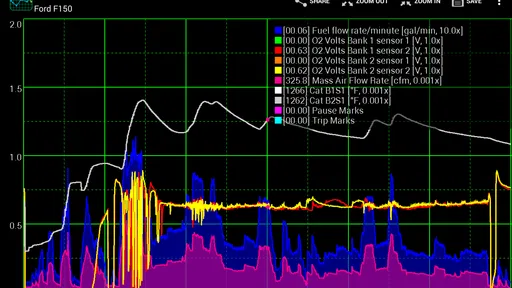
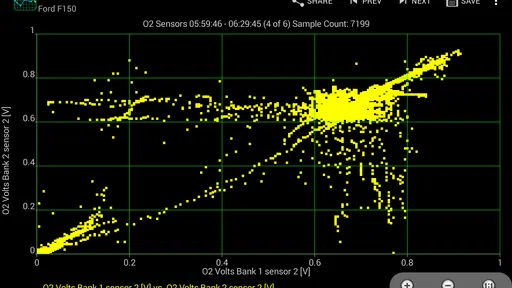
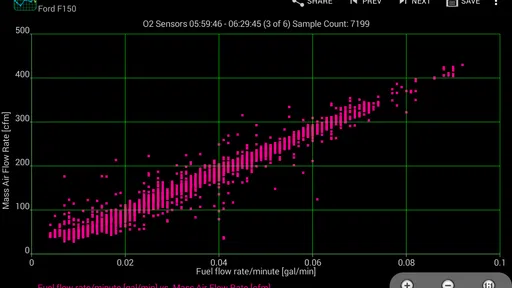
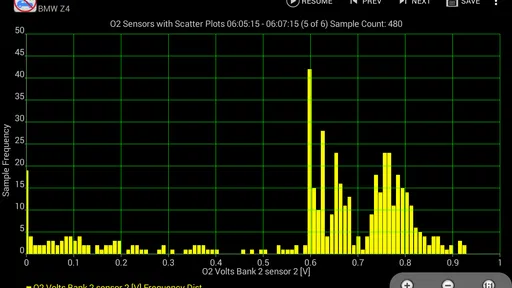
Line charts are a natural starting point when you want to follow a value as it changes. Bar and scatter views suit different ways of comparing readings, but the most useful choice depends on the question you are trying to answer. For example, if you want to see whether two readings appear to move together, an overlay or scatter view may be more informative than placing several unrelated values on one busy screen.
I’d build a layout around one practical question at a time: Is a reading steady? Does it change when another value changes? Does the pattern differ between two similar drives? That approach makes customization more useful than simply filling the screen. It also gives you a way to revisit the same kind of check later, instead of changing several chart settings and losing track of what the comparison was meant to show.
Worth Reading Before You Choose

Baby Panda World Brings Quick Play to Modern Phones, but Its Game Library Feels Busy

ESPN’s Live Game View Makes Following Close Games Easier

QuizzLand Review: A Good Fit for Short Trivia Breaks, Not Every Player

Basketball Stars: Multiplayer Is Fast, but Can It Recover When Matches Go Wrong?

WEBTOON Turns Phone Updates Into a Better Reading Routine

Link to Windows Runs on Shared Habits, Not Social Feeds
What to expect from the purchase
Realtime Charts is a paid app from Crystal Lake Apps LLC, priced at $2.49. It has a 4.2 average from around 370 ratings, with over 10K installs, and its content rating is Everyone. It was released on February 17, 2016; version 1.70 lists Android 4.0 as its minimum operating system. Those details make it a modestly priced, established add-on, but the key buying question is compatibility with your existing Torque Pro setup and whether you will actually use chart views.
If you do not already rely on Torque Pro, compare the total setup with the simpler alternative of using a basic OBD-II app that presents readings directly. A general vehicle dashboard may be quicker for occasional checks, while a mechanic’s scan tool is the better route when you need professional diagnosis. Realtime Charts makes most sense for someone who already has the Torque Pro workflow and wants more visual ways to examine its readings.
Before buying, I’d ask myself whether I can name two or three readings I genuinely want to compare. If the answer is no, the extra charting may add setup and screen clutter without changing how I maintain the car. If the answer is yes, begin with just those readings and expand only when a specific question calls for it. The app is most rewarding when the charts help you notice a pattern, not when they become a collection of impressive-looking but unexplained lines.
Have you ever been cruising down the road, only to wonder how your car's engine is really performing? Well, wonder no more! Let me introduce you to Realtime Charts for Torque Pro. If you've got Torque Pro, this app is like the cherry on top of your car monitoring sundae. It takes all that data floating around in your car's brain and makes it look, well, pretty darn impressive.
Getting Started with Realtime Charts
Diving into Realtime Charts for Torque Pro is like opening a treasure chest of engine data. Once you've got it installed, and trust me, it's a breeze, you can connect it to Torque Pro. If you're familiar with Torque Pro, you know it’s already a powerhouse. But adding Realtime Charts? It’s like giving it a turbo boost.
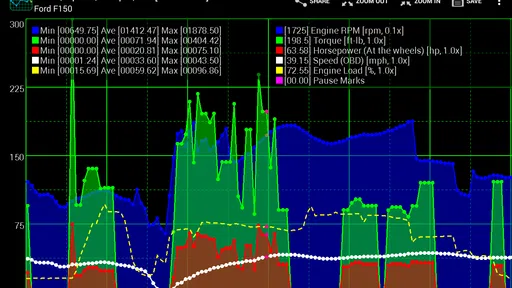
The setup is straightforward. You just need to sync it with your OBD2 device, and voilà! You're ready to see your car’s stats in real-time. It’s like having a dashboard within a dashboard, only this one looks like it belongs in a sci-fi movie. The interface is sleek, with a dark background that makes each graph pop like fireworks on the Fourth of July.
A Deep Dive into Features
Now, let’s talk features. Realtime Charts lets you visualize data like RPM, speed, fuel consumption, and more. It's basically your car's health report card, but way cooler. You can view line charts, bar graphs, and even scatter plots. And the best part? It's customizable. You can set it up to show exactly what you need, no more, no less.
What's really neat is the app’s ability to overlay different data sets. Want to see how your speed correlates with fuel efficiency? Just set it up, and boom, you've got a clear picture. It’s like having a personal mechanic sitting next to you, showing you what’s happening under the hood.
Why You'll Love It
Okay, so here’s the deal. If you’re a data nerd like me, this app is going to be your new best friend. And even if you’re not, the practical benefits are too good to pass up. You get to keep an eye on your engine’s performance, potentially catching issues before they turn into costly repairs. Plus, it gives you bragging rights with your friends. Who doesn’t want to show off all those fancy graphs?
- Easy integration with Torque Pro
- Customizable charts and graphs
- Real-time data visualization
- Overlay capabilities for comprehensive analysis
The Learning Curve
Don’t get me wrong, it’s not all rainbows and butterflies. There’s a bit of a learning curve if you’re new to this kind of tech. But once you get the hang of it, it’s smooth sailing. The app does a good job of providing tooltips and explanations, but it helps to have a basic understanding of car diagnostics going in.
And while the interface is sleek, it can get a bit crowded if you’re trying to track too many metrics at once. My tip? Start simple. Pick a few key metrics to monitor and add more as you get comfortable.
Final Thoughts
All in all, Realtime Charts for Torque Pro is a solid addition to any car enthusiast's toolkit. It’s not just about keeping your engine in check; it’s about understanding your vehicle on another level. If you're serious about car maintenance or just love geeking out over data, this app is worth every penny.
So, next time you hit the road, take Realtime Charts along for the ride. It’s like having a tiny pit crew in your pocket, ready to keep you informed and your car running smoothly. Trust me, once you start using it, you’ll wonder how you ever drove without it.
Pros
- Offers real-time data visualization.
- Highly customizable chart options.
- Integrates well with Torque Pro.
- User-friendly interface design.
- Supports multiple sensor inputs.
Cons
- Requires Torque Pro for functionality.
- Might drain battery quickly.
- Limited support for older devices.
- Initial setup can be time-consuming.
- Some features need in-app purchases.
FAQs for Realtime Charts for Torque Pro
What is Realtime Charts for Torque Pro and how does it work?
Realtime Charts for Torque Pro is an app extension designed to enhance the Torque Pro experience by providing real-time data visualization. It allows users to create customizable charts that display various vehicle parameters. This tool connects to the vehicle's OBD II system, translating engine data into easy-to-read charts that help monitor performance and diagnose issues.
Is Realtime Charts for Torque Pro compatible with my vehicle?
The app is compatible with most vehicles equipped with an OBD II port, typically those manufactured after 1996. However, compatibility can vary based on vehicle make, model, and year. It's recommended to check your vehicle's specifications and ensure you have the Torque Pro app and a compatible OBD II adapter.
Do I need any additional hardware to use Realtime Charts for Torque Pro?
Yes, you will need an OBD II adapter to connect your smartphone to your vehicle's onboard diagnostics system. This adapter acts as a bridge between your vehicle and the Torque Pro app, allowing data to be streamed and displayed on the Realtime Charts extension. Ensure that your adapter is compatible with both your vehicle and smartphone.
Can I customize the charts in Realtime Charts for Torque Pro?
Absolutely! Realtime Charts for Torque Pro offers extensive customization options. Users can select which vehicle parameters they want to monitor and customize the appearance of the charts. This includes adjusting colors, scales, and types of graphs, allowing for a personalized and intuitive data monitoring experience.
How can Realtime Charts for Torque Pro help with vehicle maintenance?
By using Realtime Charts for Torque Pro, users can gain insights into their vehicle's performance in real-time. This app helps identify potential issues before they become serious problems, such as irregular engine functions or inefficient fuel usage. Monitoring these parameters can lead to timely maintenance and improved vehicle longevity.


